How to Identify and Replace a Faulty IS230TNCIH2C in Critical Systems
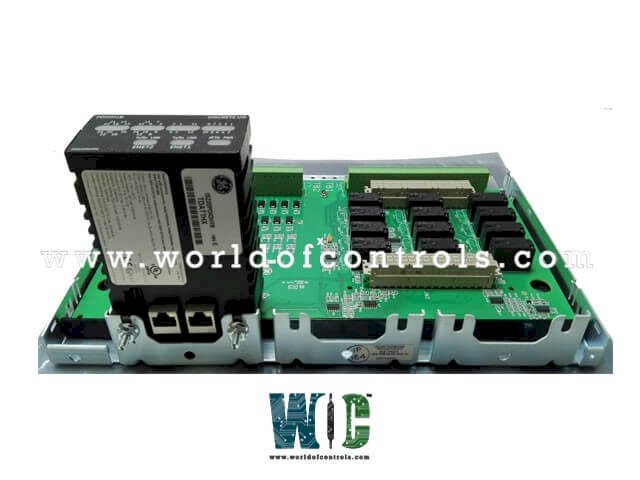
In the high-stakes world of industrial automation, the reliability of a control system is only as strong as its weakest link. For those utilizing the General Electric (GE) Mark VIe platform, the IS230TNCIH2C Input DIN-Rail Module often serves as that vital link. This discrete input module is responsible for translating field signals into actionable data for the controller—meaning a failure here isn't just a technical nuisance; it’s a potential threat to plant safety and operational uptime.
Whether you are managing a power generation facility or a complex manufacturing plant, knowing how to diagnose and swap this specific module is a core competency for any I&C technician.
Identifying the Failure: Red Flags
Before pulling hardware off a rack, you must confirm the IS230TNCIH2C is actually at fault. Discrete input failures usually manifest in one of three ways:
-
Diagnostic LEDs: The most immediate indicator is the faceplate. A healthy module shows a steady "Run" light. If you see a solid or flashing Red "Fault" LED, the internal watchdog has detected a hardware or communication failure.
-
HMI Alarms via ToolboxST: Your control room operators will likely see a "Loss of IONet Communication" or a "Composite Diagnostic Alarm." Within ToolboxST, check the component heartbeats; if the module's attributes show "Invalid" or "Not Connected," the hardware has likely dropped off the network.
-
Erratic Signal Behavior: If a field switch is closed but the HMI shows it as "Open" (or if the signal is "flickering" despite a steady voltage at the terminal), the optoisolators within the H2C circuitry may be failing.
Pre-Replacement Checklist (Safety First)
Working on critical systems requires a "measure twice, cut once" mentality. Before touching the DIN rail:
-
Verify the Revision: The H2C suffix is specific. Ensure your spare is an exact match. Using an H1A or an older variant can lead to firmware mismatches that prevent the controller from recognizing the new hardware.
-
Establish a Safe State: If this module handles an Emergency Trip (E-Stop) or a critical fuel valve limit, ensure the loop is bypassed or the equipment is in a state where a lost signal won't trigger an unplanned shutdown.
-
ESD Protection: These modules are sensitive to static. Always use an anti-static wrist strap grounded to the cabinet frame.
Step-by-Step Replacement Procedure
1. Isolation and Disconnection
Begin by disconnecting the IONet cables (the Ethernet-style cables providing the communication backbone). If the module is part of a Simplex system, this will trigger a loss of data; in TMR (Triple Modular Redundant) systems, the other two modules will maintain the vote. Carefully unplug the terminal blocks.
Pro Tip: Never pull on the wires themselves. Use a small screwdriver to back off the tension and pull the entire terminal header away from the module body if the design allows.
2. Mechanical Removal
The IS230TNCIH2C is mounted on a standard 35mm DIN rail. Locate the plastic locking tab (usually at the bottom). Pull this tab down using a flat-head screwdriver to release the tension, then pivot the module upward and off the rail.
3. Installing the New Module
Seat the top hook of the new IS230TNCIH2C onto the DIN rail and pivot it downward until the locking tab "clicks." Ensure it is firm; the DIN rail often acts as the functional ground for the module’s internal shielding.
Post-Installation: Configuration & Testing
Once the hardware is physically installed and the IONet cables are reconnected, the software takes over:
-
Firmware Sync: Open ToolboxST. The system should detect the new MAC address. If the firmware version on the new module is older than the project requirements, you will need to initiate a "Download" to the module to synchronize the code.
-
The Loop Check: Do not assume the fix is complete just because the Red LED went away. Have a technician toggle the field device (e.g., flip the limit switch) and verify the "State" change on the HMI.
-
Clear Alarms: Once the signal is verified, "Acknowledge" and "Reset" the diagnostic alarms to ensure the system returns to a "Green" healthy status.
Conclusion
The IS230TNCIH2C - Input DIN-Rail Module is a workhorse of the GE Mark VIe system, but like all electronic components, it has a finite lifespan. By following a structured identification and replacement protocol, you turn a potential multi-hour outage into a routine 15-minute maintenance task.
Check Also - IS200STCIS4A - Simplex Contact Input Terminal Board
What's Your Reaction?