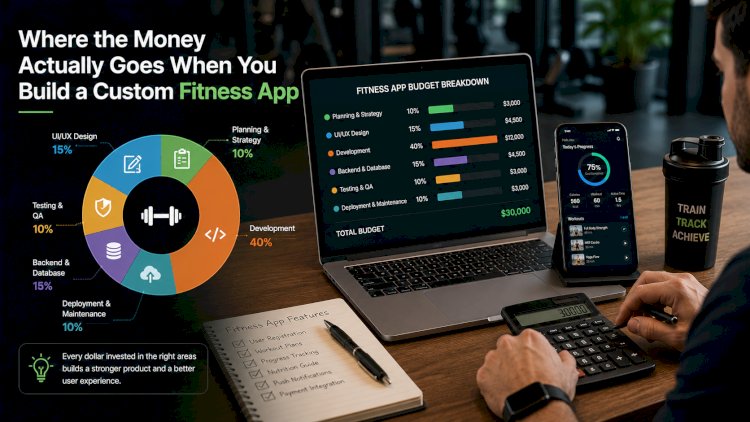
Where the Money Actually Goes When You Build a Custom Fitness App
Priya runs a strength studio with a loyal following and a waitlist for her 6 AM classes, and when she asked three different developers what it would cost to turn her programming into an app, she got back $25,000, $85,000, and $220,000 for what she assumed was roughly the same request. None of the three developers were lying to her. They were pricing three different apps that happened to share a name.
That kind of gap is exactly why picking the right fitness app development company matters as much as picking a number off a quote, because the price only makes sense once you know what's actually driving it. A basic workout tracker and an AI-powered coaching platform both technically qualify as "a fitness app," but they don't share a budget, a timeline, or a tech stack. Here's what actually separates a $25,000 build from a $220,000 one, and where a studio owner like Priya should expect her own money to go.
What a Basic App Actually Includes
The entry tier covers an exercise library, a user profile, manual workout logging, and basic push notifications, usually built on a single cross-platform codebase so it runs on both iOS and Android without doubling the work. At this level, the fitness app development cost typically lands between $20,000 and $50,000, and most of that goes toward design and the core build rather than anything flashy. There's no AI, no wearable sync, no video streaming. It's the version that works for a studio that mainly wants members to log workouts between classes, not replace the in-person coaching itself.
For a studio like Priya's, this tier would technically function, but it wouldn't capture what actually makes her classes worth a waitlist: the coaching itself.
Where the Real Money Goes
Once wearable integration, video content, and any kind of AI personalization enter the picture, the number moves into a completely different range, usually $50,000 to $150,000. Syncing with HealthKit or a Fitbit API sounds like a small checkbox on a feature list, but it means building and maintaining a data pipeline for every device type members actually own. Video is worse than people expect: hosting workout classes means a CDN, a transcoding pipeline, and adaptive streaming so a class doesn't stall out on someone's gym WiFi, and that infrastructure keeps costing money long after the app ships, not just once during development.
AI coaching adds its own layer, and the decision between on-device and cloud-based AI changes both the cost and the experience. On-device models built with something like Core ML or TensorFlow Lite run without an internet connection and don't rack up a per-request bill, which matters for something like real-time form correction during a workout. Cloud-based AI, run through a provider's API, is faster to build and easier to update later, which is why most fitness apps end up using both: on-device for anything that needs to respond instantly, cloud for the slower stuff like generating a new week of programming based on how someone's been performing.
The Costs Nobody Puts in the Estimate
The number on a proposal almost always covers development. It rarely covers what happens after launch, and that's where budgets quietly blow past what a studio owner planned for. Cloud hosting costs scale with active users, not downloads, so a successful app gets more expensive to run every month it grows. Health data brings its own compliance weight too, encryption standards and privacy safeguards aren't optional once an app is tracking someone's heart rate or workout history, and building that in from the start costs less than retrofitting it after a security review flags the gap. Add in App Store and Google Play developer fees, ongoing maintenance for OS updates, and a marketing budget that's entirely separate from the build itself, and the true first-year number usually runs well past whatever the initial quote said.
Cross-Platform or Native: The Choice That Changes Everything
Most fitness apps in 2026 get built with a cross-platform framework like Flutter, which lets a single codebase ship to both iOS and Android and typically saves a quarter to a third of what building two separate native apps would cost. That's the right call for most studios. The exception shows up with computer vision, specifically real-time form correction that watches someone's squat depth or elbow angle through the camera, where native iOS development still holds a real performance edge over cross-platform tooling. If Priya wants her app to actually critique someone's deadlift form the way she does in class, that single feature is often reason enough to go native, even though everything else about her app would be cheaper built cross-platform.
How You Plan to Make Money Changes What You're Building
A subscription app, a one-time purchase, and a corporate wellness product sold to HR departments in bulk are three different pieces of software wearing the same interface. Subscriptions need billing logic, trial periods, and churn tracking built into the backend from day one. A marketplace model, where independent trainers upload and sell their own programs, needs a whole layer of content moderation and payout logic that a single-studio app never has to touch. Corporate wellness licensing, which is becoming one of the bigger growth areas for fitness apps this year, usually means bulk user provisioning and admin reporting tools that individual consumers never see. Deciding on the business model before writing a line of code is what keeps a studio from paying to rebuild the backend six months after launch.
Priya ended up going with the middle quote, the $85,000 one, once she understood that the $25,000 version couldn't sync with the wearables half her members already owned, and the $220,000 version was pricing in a marketplace feature she'd never actually use. The right number was never the cheapest one or the most expensive one. It was whichever one matched what she was actually trying to build.
What's Your Reaction?